In this article:
General Information
What is Sky Pod?
Sky Pod is a small, streaming media device that plugs into an HDMI input on your television – delivering Sky TV (without the dish), TV on demand and streaming apps all in one place. You can also Chromecast to the Sky Pod.
Note: For the best entertainment experience, we recommend a minimum download speed of 100mbps.
Do I need a satellite dish for a Sky Pod?
No, Sky Pod doesn’t require a satellite dish or installation of one. You will need an internet connection - we recommend fibre broadband with a minimum download speed of 100mbps for the best experience.
Can I upgrade my subscription on the Sky Pod?
The ability to add a package/channel is now available via the Sky Pod!
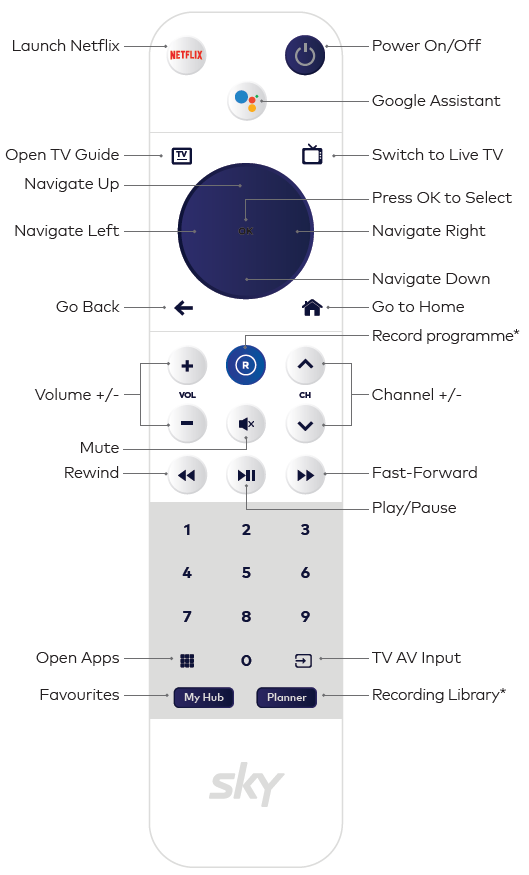
Just press the My Hub button on your Sky remote and follow the below:
- Scroll to and select My Account, then select Manage Packages
- Once in Manage Packages, select Add Sky packages
- On the next screen, you'll see details of the package along with any promotional information, and also add the selected channel/package
- When the selected package is added, you'll be required to enter your 4 digit Parental PIN for your Sky Pod
- If you've successfully entered your PIN, a message will pop-up confirming your purchase.
To view the added/active package, press My Hub and go back to My Account.
Can I record with Sky Pod?
Sorry, recording is not available with Sky Pod. However, you can stream your favourite entertainment anytime, anywhere in New Zealand with the Sky Go app, so long as you have an internet (fibre) connection. If you don’t have a good internet connection, you can download most content to Sky Go to watch when you do have a good internet connection.
If recording is important to you, we recommend you check out our new Sky Box, with a 1TB hard drive and a My Sky subscription you’ll have loads of storage space to record and keep more of what you love to watch when it suits you.
What streaming apps are included with Sky Pod?
Sky Pod comes with Netflix, TVNZ+, Three Now, Disney+, Neon, and Amazon Prime preloaded. You can download other streaming apps from the Google Play Store. Your subscriptions to Sky TV content and streaming apps are additional to the one-off, non-refundable price for the use of Sky Pod.
Note: For the best entertainment experience, we recommend a minimum download speed of 100mbps.
How do I Chromecast to the Sky Pod?
If you’re using a app that supports Chromecast, you will need to launch the selected app and select Sky Pod as the device you want to cast your content to.
Is Sky Pod portable?
Yes, Sky Pod is portable and can be used on any TV with an HDMI connection, and so long as you have an internet connection.
How much does Sky Pod cost?
The Sky Pod is currently available at no cost to new and existing Sky customers for a limited time. T&Cs apply.
Does Sky Pod come with a remote control?
Yes, the Sky Pod uses the same voice activated remote as our new Sky Box. You can use your voice to search shows, go to your home screen, open apps and more. Just ask Google. You will need a Gmail account to use the voice activated remote.
Can I use Sky Go with Sky Pod?
Yes, as long as you subscribe to at least Sky Starter. And with Sky Go you can watch up to two screens at once in addition to streaming through the Sky Pod.
What is restart live TV?
This is a feature only available with Sky Pod, for most of our sports and entertainment content. You won’t miss the start of the big game or show, simply select the show you want to watch in the TV Guide and choose “Watch Live” or Watch from start”.
What’s reverse EPG?
This is a feature only available with Sky Pod for most of our sports and entertainment. If you’ve missed a programme, simply scroll back up to 72 hours via the TV Guide to watch what you’ve missed.
Note: We don’t always have the rights to show all our content On Demand or on replay functions. These rights are provided by the content producers and are at their discretion. We’re constantly working with our partners to try and provide our customers with the greatest access to content across all platforms.
Will I still be able to access Live TV through Sky Pod?
Yes, you will be able to watch Live TV through Sky Pod. Note that TVNZ channels, including TVNZ 1, TVNZ 2 and Duke, can be found on the TVNZ+ app, but not on the Sky Pod TV Guide.
If I don’t have a 4K TV will the 4K or HD feature work?
Our Sky Pod is 4K (UHD) ready and you will be able to stream 4K content from any subscription apps you have as long as you also have a 4K TV. To watch the Sky Sport 1 4K UHD channel on the Sky Pod you will require a 4K compatible TV or device and a valid Sky Sport subscription. All other Sky content is currently available in HD and SD, so a 4K TV is not needed for this.
How long will it take to get delivered?
Sky will endeavour to dispatch your device, from our Auckland based warehouse, by the following business day. Once your device has been picked up by our courier partner, a tracking number will be sent to the email address linked to your account, and you will be able to track your devices expected arrival.
Can I connect my existing Sky account to the Sky Pod or create a new one?
Yes, you will keep your existing Sky account number.
Can I book Pay Per View events and Sky Box Office movies on the Sky Pod?
Pay Per View events (Sky Arena) and Sky Box Office movies are now available on Sky Pod. Find out more on How to purchase Sky Arena Events or How do I rent a Sky Box Office movie.
TV Guide Tips & Shortcuts
Return to the top:
Press the TV Guide button at any point to return to the first position in the guide.
Skip to the day:
Press the Fast Forward and Rewind buttons on your remote to +/- 24 hours from your current position in the grid.
Zap to a channel:
Use the number pad on your remote to jump straight to a channel in the guide.
Scroll by pages:
Press Channel Up or Channel Down on your remote to move up or down a page in the guide.
Back to the channel:
While scrolling in the grid, press the Back button to return to the channel tile.
View past shows:
Select the ‘Reverse EPG’ icon next to the ‘Today’ button at the top of the grid, to view the schedule from the previous 72 hours