There are certain issues that you may experience that may not affect all channels or may not give a certain error message. This may range from poor/pixelating pictures to problems with certain channels during certain times of the day.
If you're experiencing this, try the following troubleshooting steps:
Step 1
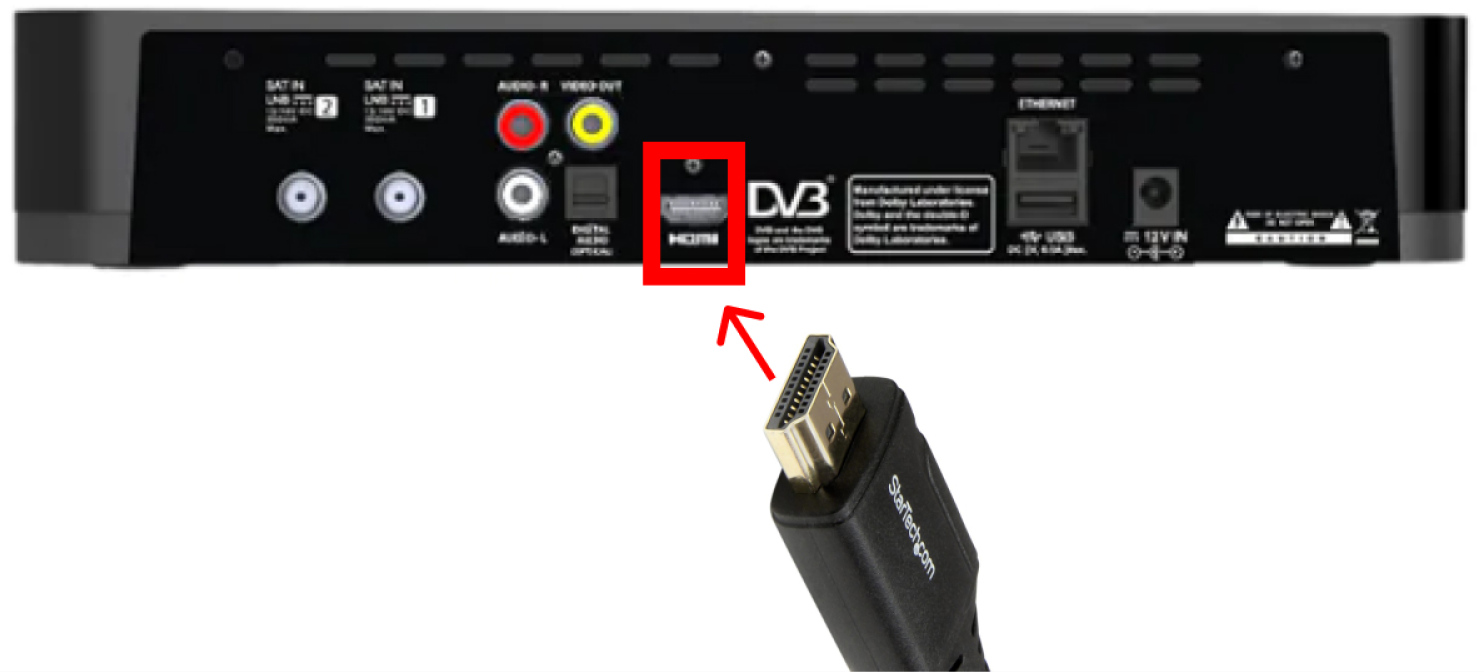
Remove the HDMI cable and insert it back. Ensure it's firmly in place.
Audio and video signals are being sent from the box to the TV via an HDMI cable, which can become a bit loose due to tampering (e.g., dusting near the box area) or micro-vibrations, especially if the house is located near busy roads or construction areas.
Step 2
Unscrew satellite cable and screw it back into Input 1. (If the splitter installed, do the same - unscrew satellite cable and screw it back).
Audio and video signals are being sent from the dish to the box via the satellite cable, which can become loose overtime due to micro-vibrations, especially if the house is located near busy roads or construction areas.

Step 3
Perform a box reset (sometimes this helps to resolve the issue).
Step 4
Check for the signs of wireless satellite signal interference (appliances such as cordless phones, microwaves in use can interfere with the signal). To test, turn all appliances off at the wall and leave the Sky Box and TV on, then turn things on one at a time using the process of elimination to see what is causing the interference. Be sure to inform the technician during their visit. This will help them to troubleshoot and find the appropriate solution, reducing the need for a repeat visit.
If wireless signal interference is the issue or none of the above resolves the problem, a technician visit will be required to continue troubleshooting and discuss possible solutions.


